Managing your account balance is an important part of using the platform. The deposit and withdrawal process is designed to be simple, allowing users to add funds and request withdrawals through supported payment methods. Before making any transaction, ensure that your account information is correct and carefully review the platform’s payment guidelines.
Deposit Overview
Depositing funds allows users to access the platform’s available features and services. The process is straightforward and usually takes only a few minutes when using a supported payment method.
How to Deposit
- Log in to your account.
- Open the Wallet section.
- Select the Deposit option.
- Choose your preferred payment method.
- Enter the amount you want to deposit.
- Confirm the payment details.
- Complete the transaction.
- Wait for your balance to be updated.
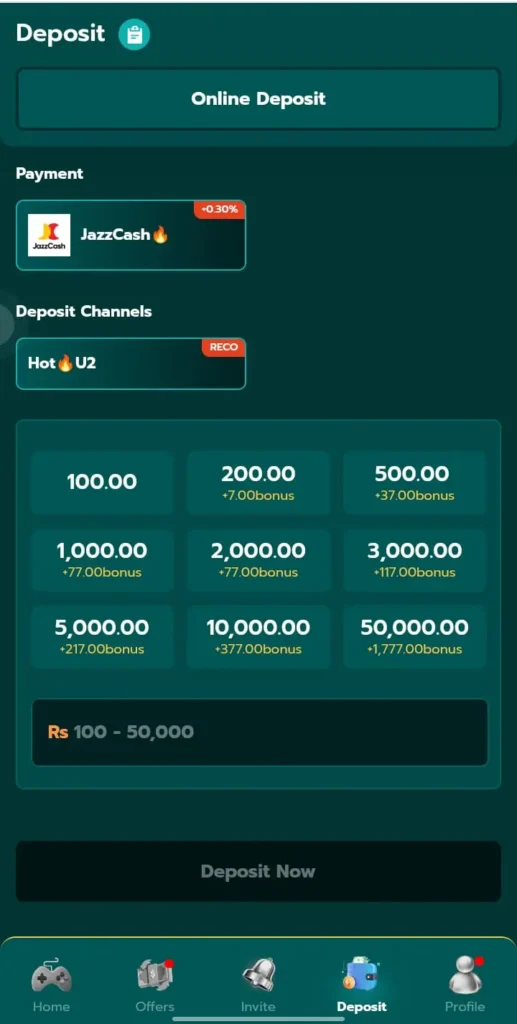
Supported Payment Methods
The platform may support several convenient payment options, including:
Payment options may vary depending on platform updates and availability.
Deposit Tips
- Double-check your payment details before confirming.
- Use only your own payment account.
- Keep a record of successful transactions.
- Ensure you have a stable internet connection.
- Follow the platform’s deposit instructions carefully.
Withdrawal Overview
The withdrawal feature allows eligible users to transfer available funds from their wallet to a supported payment account. Processing times may vary depending on the selected payment method and account verification.
How to Withdraw
- Sign in to your account.
- Open the Wallet section.
- Tap the Withdraw option.
- Choose your preferred withdrawal method.
- Enter the withdrawal amount.
- Provide the required payment details.
- Confirm your request.
- Wait for the platform to process your withdrawal.
Withdrawal Tips
- Verify your payment details before submitting a request.
- Make sure your account information is accurate.
- Check the minimum withdrawal requirements, if applicable.
- Allow sufficient time for processing.
- Contact customer support if your request remains pending longer than expected.
Common Deposit & Withdrawal Issues
| Problem | Solution |
|---|---|
| Deposit not received | Wait a few minutes and verify your payment details. |
| Withdrawal pending | Allow additional processing time before contacting support. |
| Incorrect payment information | Update your payment details and submit a new request if required. |
| Payment failed | Check your internet connection and payment account before trying again. |
| Wallet balance not updated | Refresh the application or contact customer support if the issue continues. |
Safety Tips
For a secure payment experience, never share your account credentials or payment verification codes with anyone. Always use trusted payment methods, keep your application updated, and review every transaction before confirming it. Protecting your account information helps reduce security risks.
Frequently Asked Questions
Which payment methods are supported?
Many versions of the platform support JazzCash, Easypaisa, bank transfers, and other available payment methods. Availability may change over time.
How long does a deposit take?
Deposit processing times depend on the selected payment method and network conditions.
How long does a withdrawal take?
Withdrawal requests are processed according to the platform’s procedures and the selected payment method.
Can I cancel a withdrawal request?
Whether a withdrawal can be cancelled depends on the platform’s current policies and the processing stage of the request.
Conclusion
The deposit and withdrawal process is designed to be simple, secure, and convenient for users. By following the correct steps, verifying your payment information, and using supported payment methods, you can manage your account balance with confidence. Always review transaction details before confirming any payment, keep your account information secure, and contact customer support if you encounter any issues during the process.